Q: Can I export all product images together with the product list?
A: Yes. Please follow the steps below.
Step 1: Log in to the MC Boss Web Version
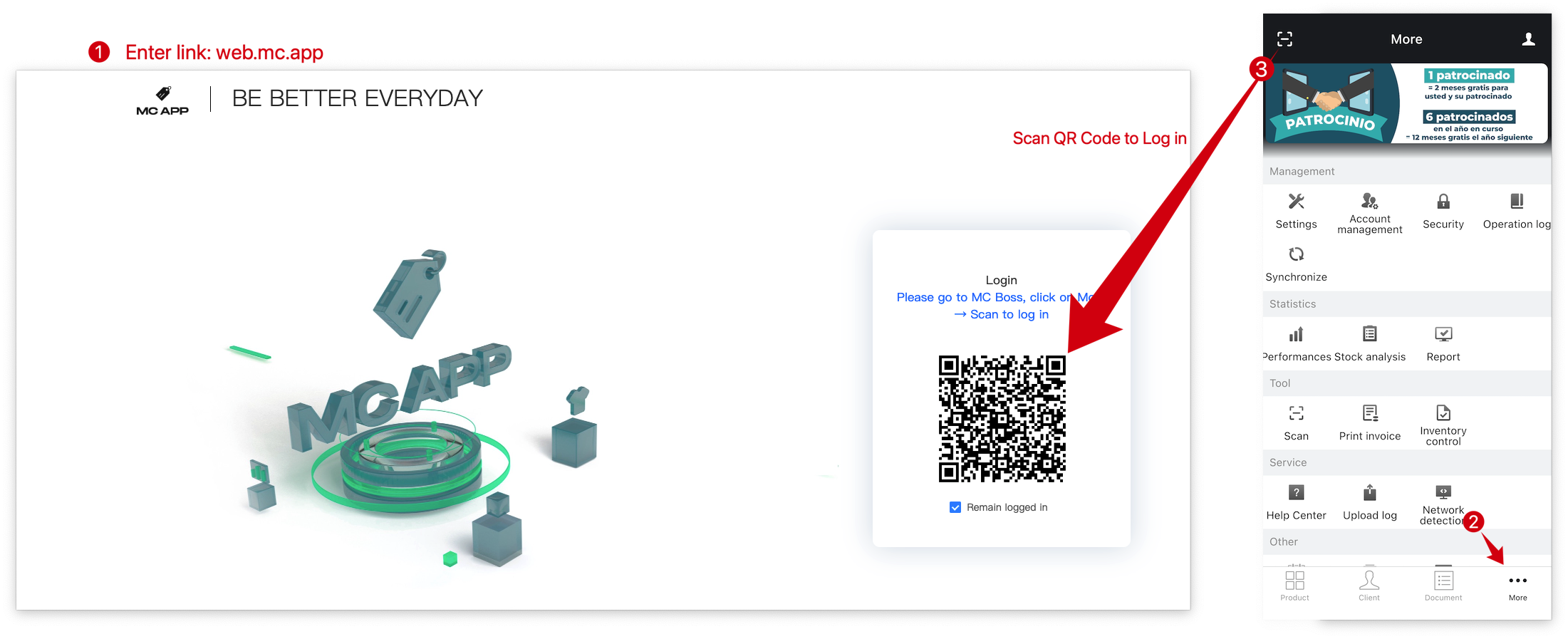
- On your computer, open a web browser and go to web.mc.app
- A QR code will be displayed on the page.
- Open MC Boss on your mobile phone, then go to More and tap “Scan” icon in the upper-left corner.
- Scan the QR code displayed on the webpage.
- Confirm the login request in the MC Boss app on your mobile phone.

Step 2: Select products in batches and export them with images
Path: On the MC Web, Products page → Select Time range → Select the order → Click "Export” → Select "Excel (with image)" → Find the exported file in the "Export History" → Click "Download"


👇 Result:

The exported product data includes both product images and image URLs. You can use the image URLs to import the product images into MC Boss.
Click to read more related articles
How to export stock data on MC Web?
How to Import or Export Product Images Between Different MC Accounts on MC Web?