MC App Knowledge

Contact us
Language:
FR French
IT Italian
CN Chinese
ES Spanish
TR Turkish
PL Polish
DE German
US English (US)
PT Portuguese
Home

    Please fill out the contact form below and we will reply as soon as possible.

    How To Bulk Modify Products Information On MC Boss?

    Updated at May 16th, 2024

    In This Article:

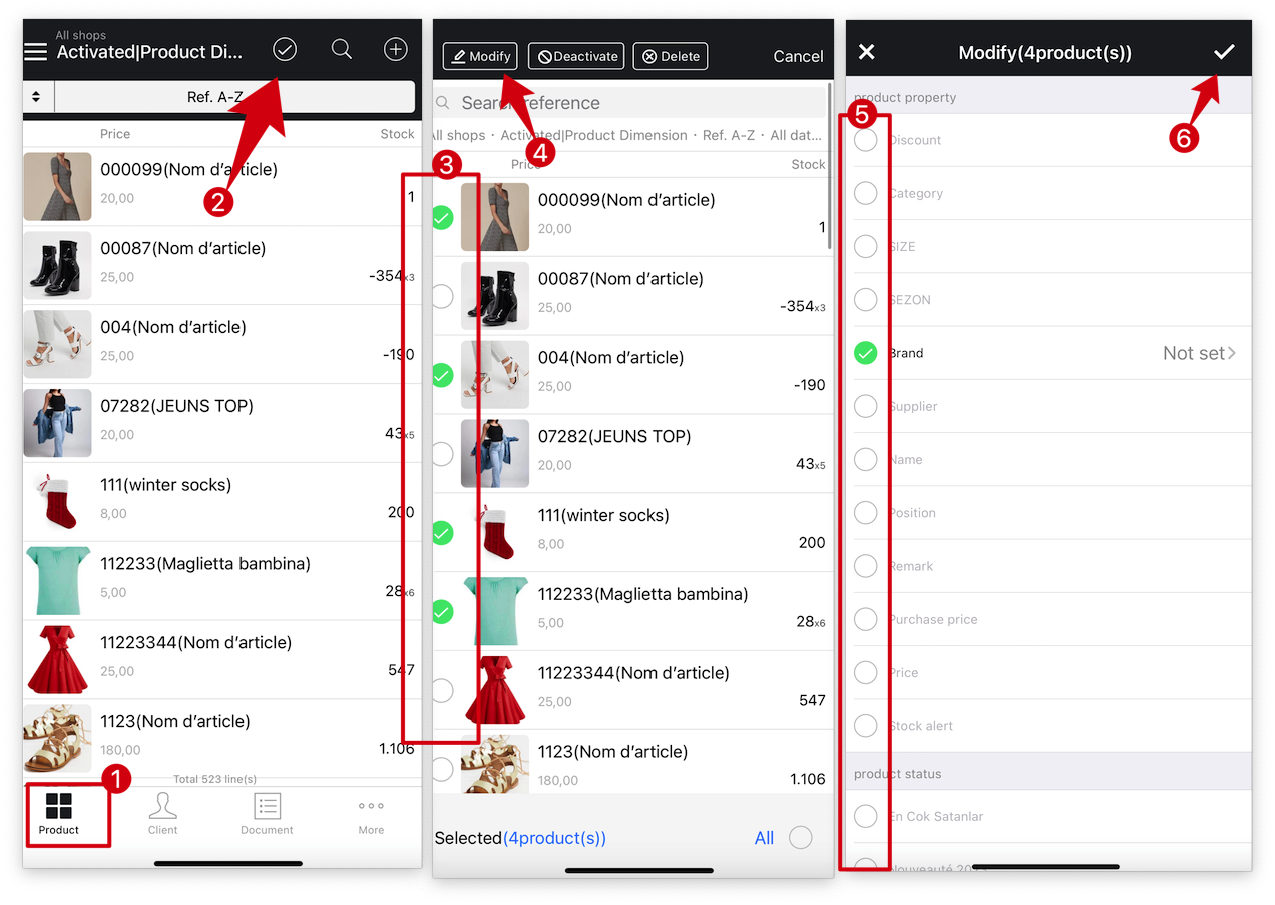
      Q:How To Bulk Modify Products Information On MC Boss?

      A:MC Boss → Product → Bulk select items → Modify → Select product property to modify → ✔️
      • products property
      • bossproductmanagement
      • modify
      • bulk
      • discount
      • category
      • size
      • brand
      • season
      • name
      • category
      • purchase price
      • price
      • stock alert

      Was this article helpful?

      Related Articles

      How to Set Up Pre-order Products in MS Manager for MicroStore? (Business Version)

      Q: How to set up pre-order products in MS Manager for MicroStore? A: If you're us...

      How to batch update product prices in MC Boss?

      Q: If the product cost decreases, can the selling prices be updated in batches ac...

      How to modify an order on MC Seller?

      Q: How to modify an order on MC Seller? A: First, go to MC Boss to enable MC Sell...

      How to check stock quantity when placing an order on MC Seller?

      Q: How to check stock quantity when placing an order on MC Seller? A:  On MC Sell...

      Powered by eFolix

      Smart CatalogContact UsFrançais


      Knowledge Base Software powered by Helpjuice

      Definition by Author

      0
      0